Agentic VRChat World Development Kit
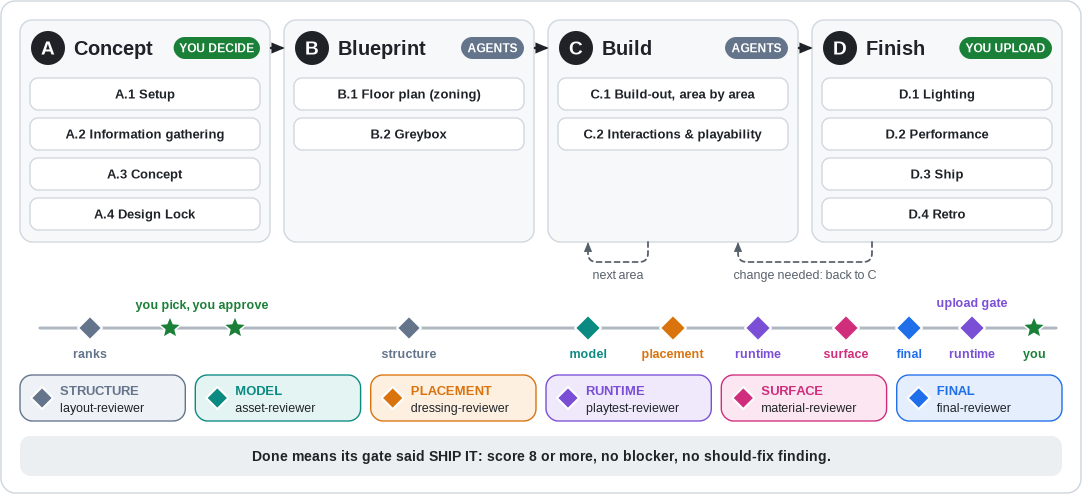
The kit lets an AI coding agent build a VRChat world in Unity from a conversation. It is a staged pipeline with review gates, subagents, skills and Unity Editor tools, all in plain Markdown. You decide the concept and style up front and the final upload; agents build the rest.
Where to go
-
What an AI coding agent is, and what it does for you in this kit.
-
The stages and gates in pictures, from the first concept art to the upload.
-
Install the kit, wire your agent, and ask for your first world.
-
Who builds, who judges, and what each one hands back.
-
The Unity checks, the gates, the decision database and the findings ledger.
-
The hard rules every world follows, each with its reason.
-
Worlds built with the kit.
What you need
| You need | Notes |
|---|---|
| Unity 2022.3.22f1, installed with Unity Hub | The version VRChat supports. Never upgraded. |
| VRChat Creator Companion (VCC) or ALCOM, and the vrc-get command line tool | They create the world project and install the VRChat Worlds SDK. UdonSharp ships inside the SDK. |
| An AI coding agent with MCP support | Claude Code, Codex, Gemini CLI, Cursor, oh-my-pi and others. MCP is the plug that lets an agent use outside tools. |
| An editor bridge | The agent's connection to the open Unity Editor: MCP for Unity or TunaSync Unity MCP. |
| git and git-lfs, Python 3.10 or newer, uv | For the kit's own tools. |
| A lightmapper | Bakery (paid) if you own it, else GLIM (free). Unity's Progressive GPU is the last fallback. |
| Blender 4.2 or newer | Optional, for custom props. The kit runs it without a window. |
Worlds are built for PC first, on the Built-in Render Pipeline. An Android and iOS port is optional. The steps are in Install.
Licence
The kit is free for personal and other noncommercial use. The kit itself may not be sold.
Worlds and assets you make with it are yours, including for sale. The full terms are in LICENSE.md.
Source
The kit is a public repository on GitHub: Agentic VRChat World Development Kit.