Talking to the agent
Say things in plain words. The kit makes sure what you said is written down before anything is built on it.
flowchart LR
    U["You say something"] --> K{"What is it?"}
    K -- "a decision or a like" --> S["Decision database<br>your exact words"]
    K -- "something looks wrong" --> F["Findings ledger<br>one case per thing"]
    S --> B["Every agent brief carries<br>the decisions it depends on"]
F --> R["Every review round<br>photographs the case again"]Decisions
A decision is anything you settle: a size, a style, a behaviour, a way of working. The agent records it on the spot, before acting. A decision that lives only in the chat would be lost.
Each world project keeps one decision database:
| File in the project | Holds |
|---|---|
STEER.jsonl |
every decision, pick and rejection, in your exact words. Never edited by hand |
Design/picks/ |
every image you liked, copied there. Rejected art goes to Design/picks/rejected/ |
DECISIONS.md |
the digest: picked art, the design lock and the decisions in force. Open this one to read |
What you can rely on:
- Decisions beat defaults. A recorded decision outranks the kit's defaults and any task brief.
- The newest decision on a topic holds. Change your mind by saying so.
- A task that contradicts a decision stops for you. The agent asks instead of overriding.
- A question you already answered is not asked again. The agent checks first.
- Helper agents get your decisions too. Each brief carries the ones its task depends on.
World defaults such as lighting, scale or performance budgets can be changed per world: just say
it. The hard rules in RULES.md are the kit's fixed rules. See Rules.
Picks
Only an explicit like counts as a pick.
| You say | The agent records |
|---|---|
| You name or point at an image and say you like it | a pick. The image is copied to Design/picks/ |
| Nothing about an image | nothing. An uncommented image is no signal |
| You say you dislike that image | a rejection. Nothing is built like it |
| "Needs more machinery" | a decision asking for a change, not a rejection |
A good pick names the image, says what you like in it, and says what does not bind. Positions, proportions and layout in a concept image are free unless you say otherwise.
Findings
A finding is anything you point out as wrong in a world. Say what you see, in your own words, with a screenshot if you have one.
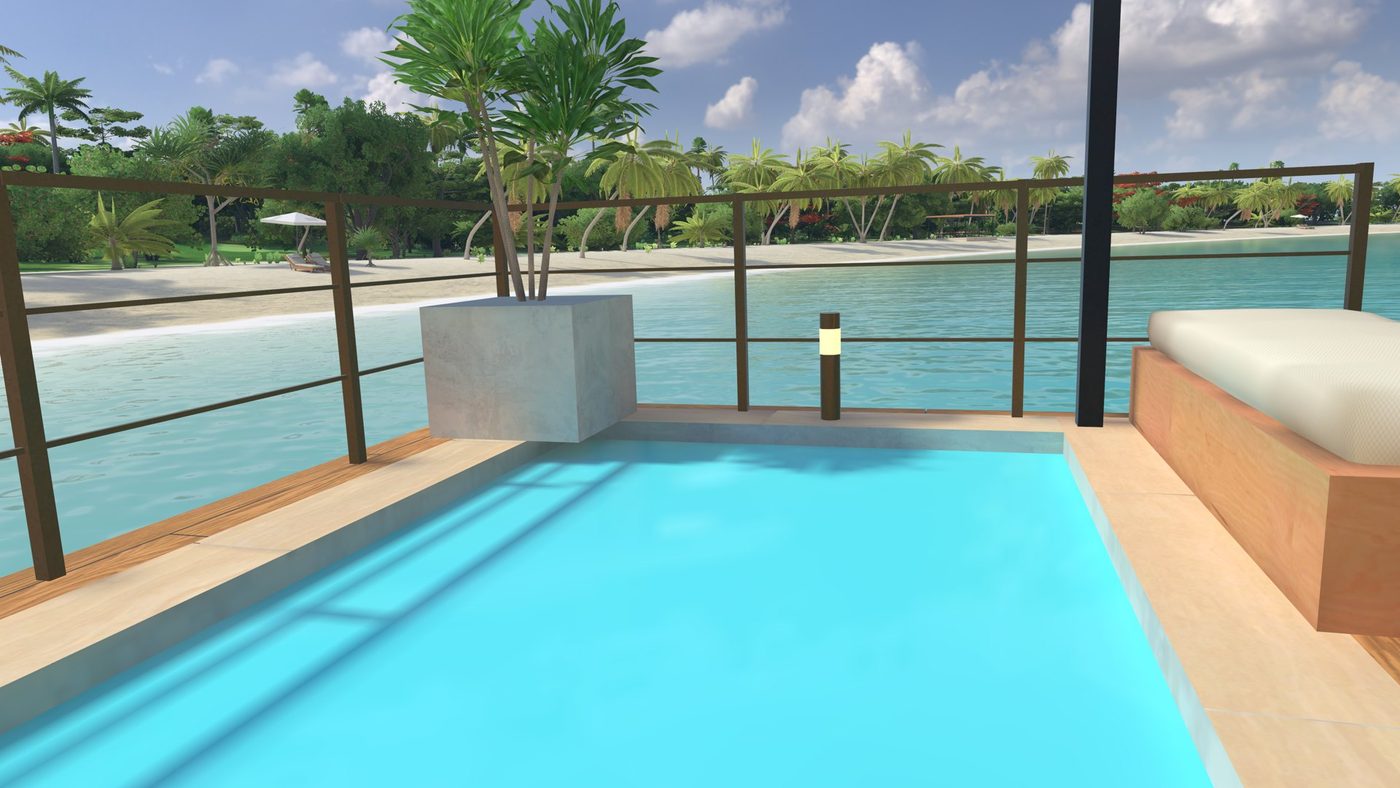
A finding from Crescent Lagoon as the owner reported it: a plant pot standing over the pool edge.
Each finding becomes a permanent case in the world's findings ledger, the file
Design/worlds/<World>/FINDINGS.jsonl. It holds your words, your screenshot and the camera view.
stateDiagram-v2
    direction LR
    state "fixed-unverified" as fu
    [*] --> open: you report
    open --> fu: fix reported
    fu --> verified: reviewer confirms
    fu --> reopened: seen again
    verified --> reopened: fails later
reopened --> fu: fixed again- Only a reviewer can set
verified. A builder saying "fixed" is not enough. - Every review round photographs every case again, fixed and verified ones too.
- A case that fails again is reopened and blocks the upload.
- Cases are never deleted. Every report lists them by id and status.
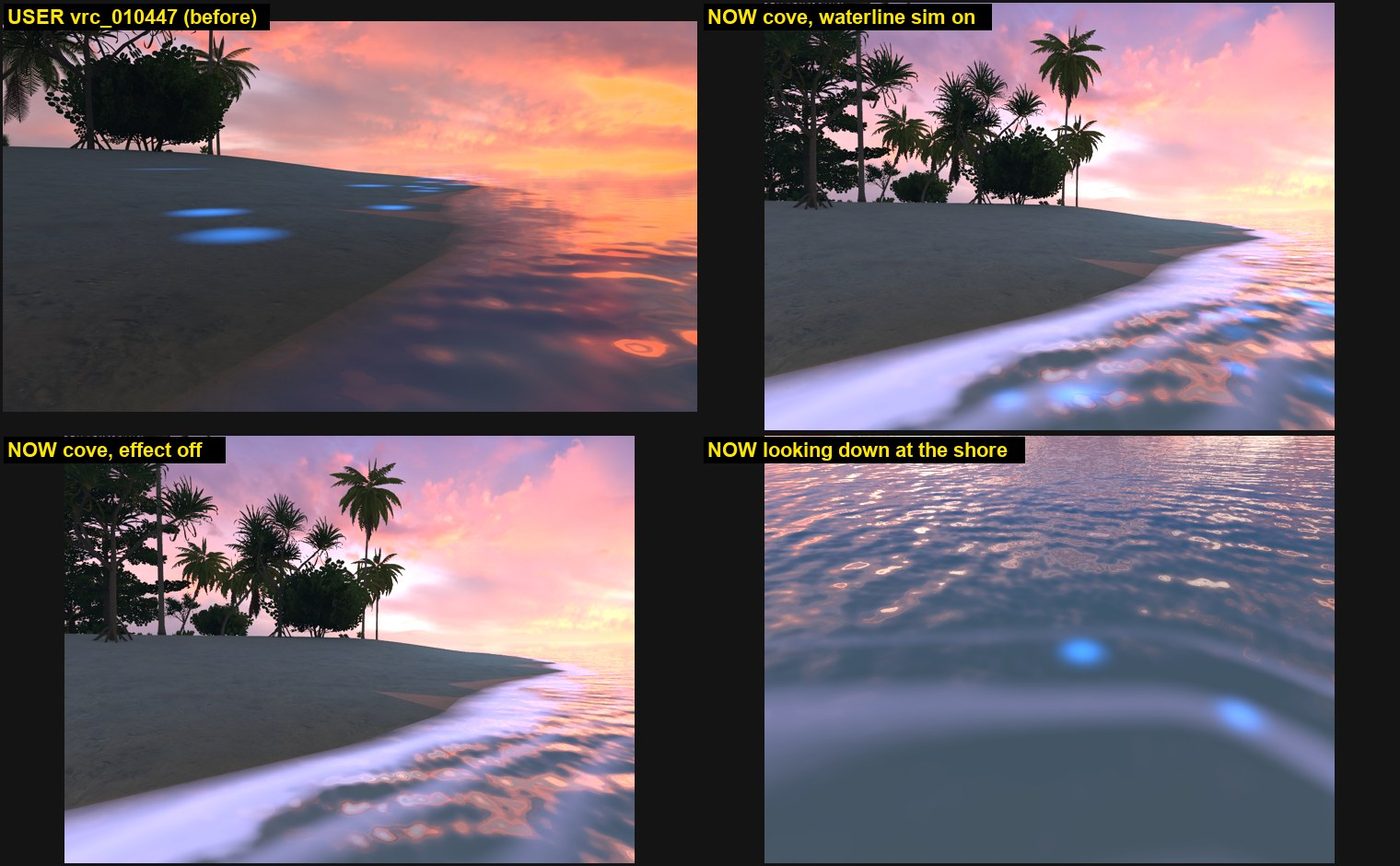
A review sheet for one case in Crescent Lagoon: the owner's screenshot (top left) next to new captures of the same place.
Reading a report
Every review ends in a verdict and a score.
| Word in a report | Means |
|---|---|
| SHIP IT | the reviewer passed it: no blocker, no should-fix finding, score 8 or higher |
| MINOR FIXES, NEEDS WORK | not passed. The findings are the agent's next task list |
| unreviewed | no reviewer has passed its current state. A change after the last review makes it unreviewed again |
| open findings | a case from the ledger is not yet verified |
| "saved", "build-ready" | only that. Never read these as reviewed |
| "not looked at" | the agent has not opened the images of that result itself |
Small and hurried work counts too. A quick placement or tweak is unreviewed until its reviewer passes it.
A world is ready for your upload when three things hold:
- the final reviewer and the runtime reviewer both pass the same saved state,
- no case in the findings ledger is open,
- you have the Build and Test list.
More: Review gates.
Stopping, pausing, steering
The agent keeps working while anything is unreviewed or has open findings. You can stop it at any point.
| You want | Say |
|---|---|
| Pause or stop | that you are pausing. The agent's last report then lists every open item by name |
| Fewer stops | "from now on just go" |
| More stops | "stop and ask me before" the stage you care about |
| To change a locked style item | that you reopen it. Locked items change only this way |
| To continue another day | that it should continue the world. It picks up from the project's WORLD.md |
The agent commits a backup after each stage, so a pause loses little. Backups stay on your machine unless you choose otherwise.
If a paid tool is set to ask first, the agent stops and asks you to approve that one generation.
Looking for yourself
You never need these, but they work from the workspace folder:
python .omp/scripts/steer.py --project <project> current
python .omp/scripts/steer.py --project <project> find --like "<words>"
python .omp/scripts/findings.py --project <project> --world <World> list --open
The first shows the decisions in force, the second searches them, the third lists open cases. Reference: Decisions and Findings.