Findings
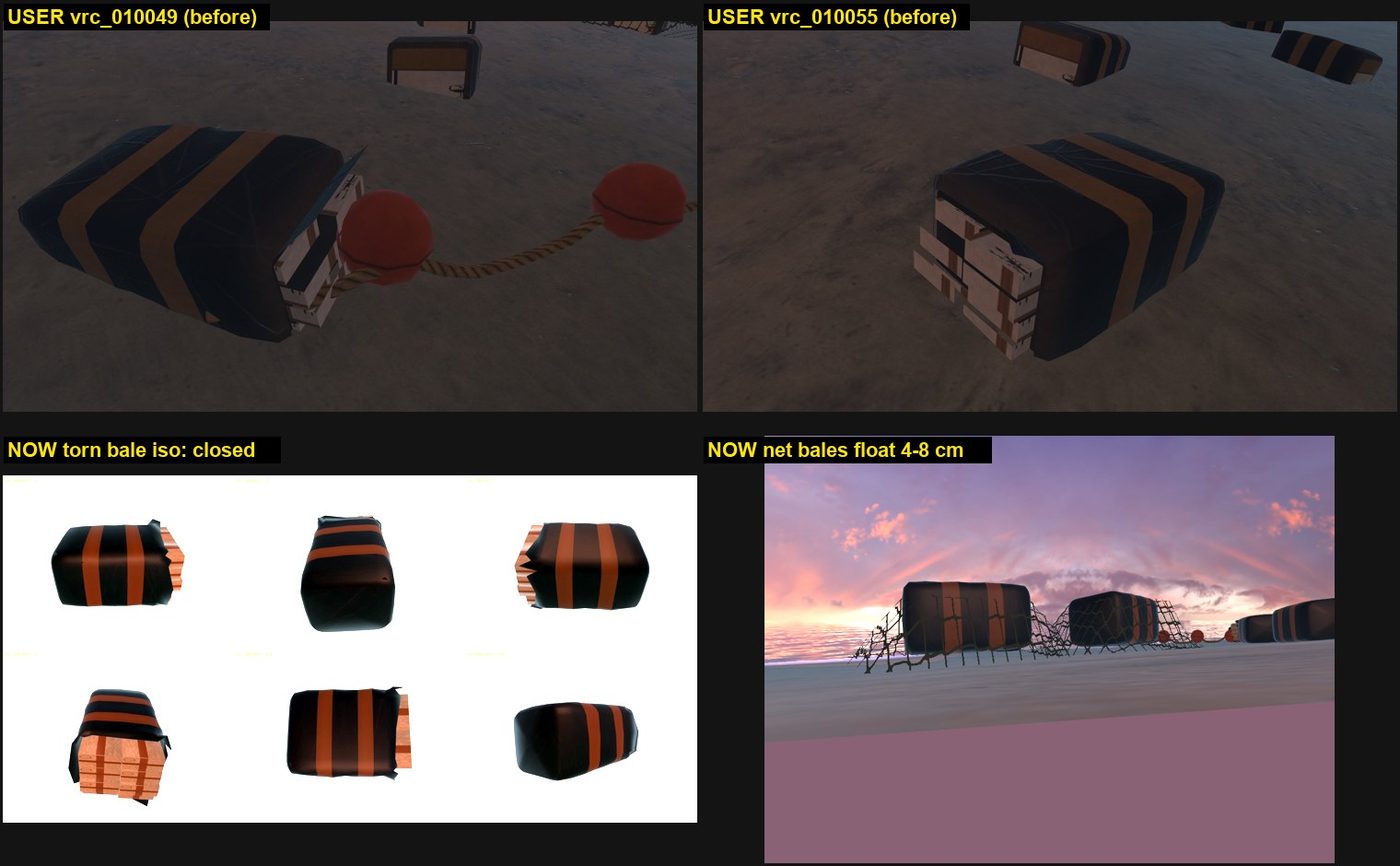
A user-vs-now sheet from a review of Crescent Lagoon. Top: the owner's in-game screenshots of holes in a bale. Bottom: the same things now. The holes are fixed. The same review found the net bales still float 4 to 8 cm and made that a blocker.
Everything you point out in a world becomes a permanent case. Every review round re-shoots every case, fixed ones included, so a defect cannot quietly come back.
The states of a case
stateDiagram-v2
    [*] --> open: you report a defect
    open --> fixed_unverified: a builder reports the fix
    fixed_unverified --> verified: a reviewer re-shot it and it is gone
    fixed_unverified --> reopened: a reviewer still sees it
    verified --> reopened: a later round sees it again
    reopened --> fixed_unverified: fixed again

fixed_unverified: fixed-unverified| State | Who sets it | Needs |
|---|---|---|
open |
the orchestrator, the moment you report it | your words; your screenshot when there is one |
fixed-unverified |
the orchestrator, when a builder reports the fix | --note saying what changed |
verified |
only a reviewer, for what it shot itself in that round | --reviewer and --round; refused without them |
reopened |
a reviewer | --note saying what was seen |
- A
reopenedcase is a blocker. - Cases are never deleted.
- A world is not ready while a case is
open,fixed-unverifiedorreopened. - A defect hidden, scaled, buried or disabled instead of fixed counts as still there.
The ledger file
<project>/Design/worlds/<World>/FINDINGS.jsonl: one case per line, append-only, written only by the script.
Your screenshot is copied to <project>/Design/worlds/<World>/findings/.
A case holds: an id such as F-001, your exact words, the screenshot, the camera pose, the scene objects it is about, the area, a class and a status.
The pose is the camera position, rotation and field of view that reproduces your view. It stays unknown until someone reproduces the view and records it.
Classes: mesh, model, contact, facing, joint, particles, effect, mover, lighting, material, scale, collider, interaction, layout, audio, other.
The commands
| Command | Does |
|---|---|
add --said "<your words>" [--screenshot p] [--pos x,y,z --rot x,y,z --fov f] [--target T] [--area A] [--class c] [--decision <id>] |
a new case, status open. The screenshot is copied into the project |
list [--status s] [--open] [--area A] [--class c] [--target T] [--id F-001] [--json] |
cases with their history. --open means everything not verified |
set F-001 --status fixed-unverified --note "<what changed>" |
from open or reopened |
set F-001 --status verified --reviewer <name>-reviewer --round N |
from fixed-unverified or verified |
set F-001 --status reopened --note "<what was seen>" [--reviewer r --round N] |
from fixed-unverified or verified |
set F-001 --pos x,y,z --rot x,y,z [--fov f] |
fills in or corrects a case. Also --screenshot, --target, --area, --class, --decision, --ref |
shots [filters] [--w 1600] [--out shots.json] |
a WorldCapture shots file: one shot per case that has a pose, named by case id |
sheet --now <dir> [filters] [--out file] |
user-vs-now pairs, from your screenshots and the new captures <dir>/<id>.png |
What happens in a review round
flowchart LR
    a["findings.py list"] --> b["findings.py shots"]
    b --> c[WorldCapture shoots every pose]
    c --> d["findings.py sheet"]
    d --> e{Reviewer opens every pair}
    e -- gone, cause fixed --> f[set verified]
    e -- still there --> g[set reopened: a blocker]
    e -- not judgeable at this stage --> h[names the reviewer who must judge it]
Every reviewer does this before its own criteria, for every case in its scope, whatever its status.
A defect you find is also a hole in a gate. The orchestrator finds which reviewer criterion should have caught it and fixes the rule in the kit, not only the object.
The full text is in skills/world-pipeline/SKILL.md, section "Findings ledger", and in scripts/README.md.